Basics of running Propres
- Opening ProPres
- Importing from Planning Center for Chapel/Vespers
- Importing from other sources for other events
- Linking songs to the chapel/vespers playlist
- Creating an arrangement
- Formatting the Songs
- Editing a slide
- Etiquette for running slides
- Creating a New Presentation
- Creating a new slide
- Order of Events (How to setup and run ProPres from the moment you come in to the end of the event)
Opening ProPres
The ProPresenter app is in the picture below, just click on it and this will open the app ready to go. If you get a pop-up asking to update ProPresenter, ignore that. Never EVER update ProPresenter on a show day! EVER!!!

Importing from Planning Center for Chapel/Vespers
What is a Planning Center (aka Planning Center Online aka PCO)??
An online planning resource we use to schedule chapel, vespers, and other worship events. It can be found under the Benson Links webpage and use the login info that can be found in the password vault that Jason has yet to set up.
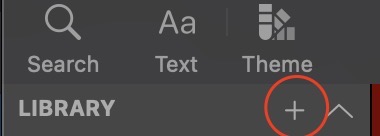
Hit that plus icon and navigate to the Planning Center Service Option.
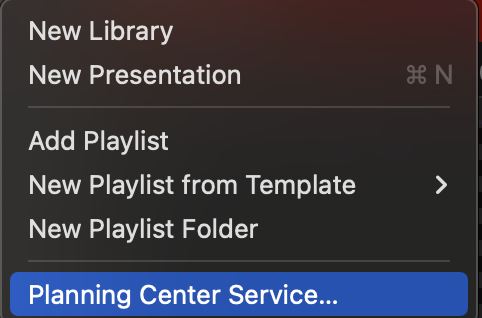
Sign in (if needed) and click on the right folder that would contain the event that you are running (Mon chapel v. Wed chapel v. Vespers). The event will be titled the date of the event.
Click on the right event and then hit select, this will then import the planning center data into ProPresenter and open the playlist. At this point, you are ready to start importing songs.
Importing from other sources for other events
- presentation
- download as a microsoft powerpoint and import
- no pdfs!!!!!!!
- drag and drop jpegs
- audio: also can drag and drop but don't do this in propres plz. qLab is preferred in almost every instance.
- video: drag and drop, or import as media from local location on computer
Linking songs to the chapel/vespers playlist
On a song, select the magnifying glass icon (photo)
if not, go to song select/ ccli to import the song, (photos walking through this)
Creating an arrangement
Definition:
go up to the top and click on the button in the photo
PHOTOS
from here, name a new arrangement "YYYY-MM-DD Event" and hit "Ok".
Formatting the Songs
2-3 lines per slide, break on natural vocal breaks (whether it is a completed phrase or due to natural pacing) include a video with examples?
same with slide breaks, but more extreme (breath = slide break, different phrases/sentences, also according to natural line breaks)
if they are changing fast, consider combining into one slide
slow transitions, break it up, trying to keep time on each slide to be similar without leaving one slide up for too long
pretty instinctive
include link or pdf to complete handbook
Editing a slide
Editing mode and quick edit
Etiquette for running slides
Rule of thumb is to always have the slide up before the audience and band get to it.
make things faster to get stuff up by using shortcuts!
the band is in-charge of the arrangement technically, you follow them and they don't follow you
Creating a New Presentation
else:
go up to top and click on plus icon and then go to "new presentation"
click that, add to correct library and playlist, and there you go
also, can use command + n to make one
Creating a new slide
go to plus icon at bottom, click either add new blank slide or in the theme you want
it will add it after the currently selected slide
Order of Events (How to setup and run ProPres from the moment you come in to the end of the event)
Pre-Event:
- turn confidence monitor on
- log into computer (password in vault JASON has yet to set up)
- Turn projector on, bring screen down
- open propres
- Planning Center Import
- link songs
- import and link presenter slides (whenever they get to you :))
- link 10:20 video and bumper video
- link any announcements
- start working on song formatting
- help orphans and widows
- make the slide transitions flow (make 1 or 3-line slides if needed)
- make sure the theme is correct
- create an arrangement
- make a blank, intro, and copyright slide if they don't exist
- get slides in order using arrangement as the band practices, just follow them and hope for the best
During Event:
- cry
- murder propres
Post-Event:
- turn projector off and bring screen up if needed
- go to a blank slide
- turn confidence monitor off